
Day Plan
Your daily operations at a glance
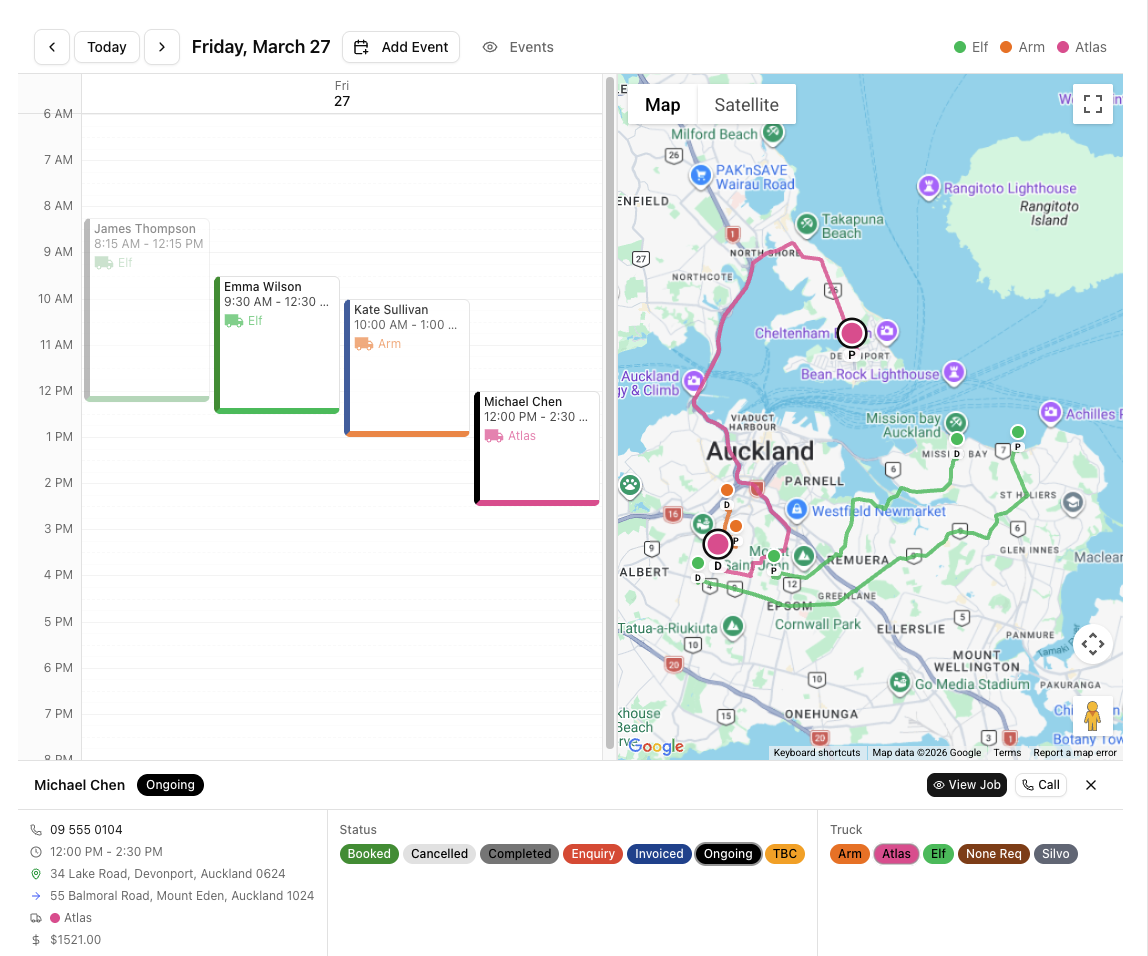
A split-screen daily operations dashboard that combines a calendar timeline with a live Google Map. See every job, every truck route, and every crew location in one view.
Why Day Plan
The advantages that make the difference for your moving business.
Your whole day on one screen
The Day Plan splits your screen between a time-block calendar on the left and a Google Map on the right. The calendar shows every job for the selected day, grouped by truck. The map shows every job location with markers and driving routes between them.
Cross-highlighting between calendar and map
Click a job on the calendar and it highlights on the map. Click a marker on the map and the corresponding job highlights on the calendar. This makes it easy to answer questions like 'where is that truck right now?' and 'what's the next job after this one?'
Live truck tracking on the map
When drivers have the VanMan mobile app running, their GPS position appears on the Day Plan map in real time. See exactly where each truck is, which direction it's heading, and how fast it's moving — all from your desk.
Powered by your calendar and fleet
The Day Plan pulls jobs from your calendar and truck positions from the mobile app. Everything updates in real time.
You might also like
See Day Plan in action
Start your free trial and explore every feature with your own data.