
Understanding delivery statuses
Read the delivery status badges on the job's Messages tab and know what each one really tells you.
Every message you send is logged on the job's Messages tab with a status badge. The badge is your evidence of what happened after you clicked send.
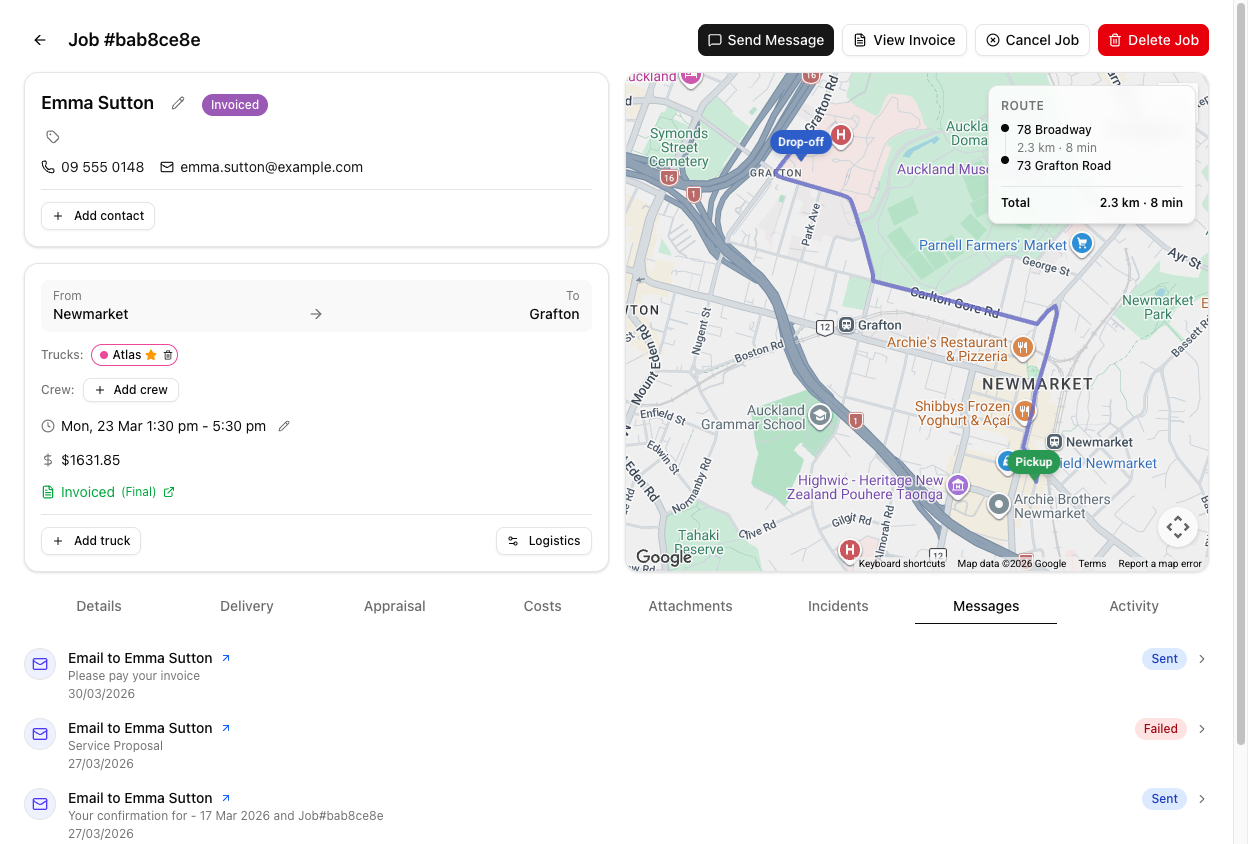
The six statuses
| Status | Colour | What it means | | --- | --- | --- | | Queued | Grey | Accepted and waiting to go out. Every message starts here. | | Sent | Blue | Handed off to the SMS or email network. Not proof it arrived. | | Delivered | Green | The network confirmed it reached the recipient. | | Failed | Red | It did not go. Bad number, bad address, or a rejection. | | Bounced | Red | The mail server rejected it. Email only. | | Opened | Purple | The recipient opened the email. Email only. |
Sent and Delivered are not the same claim, and the difference matters when a customer says they never heard from you. Sent means it left. Delivered means it landed.
Do not read these as a strict ladder. SMS reports Delivered or Failed — it does not pass through Sent on the way. Email is the one that moves through more stages. So an SMS sitting on Queued has not yet been reported on, not "stuck between sent and delivered".
Reading the tab
- Direction — an arrow shows outbound (↗, blue) or inbound (↙, green). Inbound messages from customers are recorded as Delivered on arrival.
- Label — entries read SMS to Emma Sutton, Email to Emma Sutton, or SMS from Emma Sutton.
- Time — recent messages show relative time ("5 mins ago", "3 hours ago"). After about a month they switch to a plain date.
- Click to expand — reveals the message body, and the subject for emails. Threaded inbound emails also get a Reply button.
Two things this tab does not do, despite what you might expect.
It does not update live. There is no auto-refresh on the Messages tab — a message that says Queued may well have been delivered thirty seconds ago. Reload the page to see current statuses.
There is no delivery timeline. Expanding a message shows you its text, not a history of when it was sent, delivered, and opened. VanMan stores one current status per message, not a trail.
Opened is softer than it looks
Opened only appears if open tracking reports back, which depends on your email setup. Many mail clients block the tracking pixel entirely, so plenty of emails that were genuinely read never show Opened.
Treat it as weak positive evidence: Opened means they read it; the absence of Opened means almost nothing.
When a message Fails
There is no resend button. Fix the cause, then compose a new message:
- Failed SMS — usually a wrong or non-mobile number. Fix the contact record.
- Bounced email — usually a typo'd or dead address. Fix the contact record.
- Failed with a good address — check the sender settings at Settings > Email & SMS. An SMS with no From Number configured has nothing to send from.
Tutorial: a customer says they never got their confirmation
Work it out from the evidence rather than resending blindly.
Go to the job and click Messages. This is the record of everything sent to this customer.
Reload the page first. The tab does not update on its own, so a stale Queued badge may be minutes out of date and you would be diagnosing a problem that already resolved itself.
Locate the confirmation. The badge is now your answer, and each one points somewhere different:
- No entry at all — it was never sent. Nobody clicked send. Send it now.
- Queued, and old — it never left. Check your sender settings.
- Sent or Delivered — it left, and the network took it. The problem is at their end.
- Failed or Bounced — you have the wrong contact details.
Open the contact and correct the number or address. Do not retype it into the message panel — the job will keep failing for every future message until the contact record itself is right.
Delivered means the network confirmed it arrived. Resending an identical message is unlikely to help. For email, check the badge for Opened — but remember its absence proves nothing, since tracking is frequently blocked.
The useful move here is a different channel. If a delivered email went unread, send an SMS.
Sent is weaker than Delivered — it left VanMan but was never confirmed as landing. This is the one case where resending is genuinely reasonable, and where switching channel is better still.
Click the message to expand it. Confirm the body says what you think it says — a template with a broken variable can produce a message that arrived perfectly and made no sense. "Delivered" and "useful" are different things.