
Managing incoming SMS replies
How customer SMS replies get matched to jobs, where they appear, and when they don't.
When a customer texts back, VanMan tries to attach their reply to the right job automatically. It usually works. Understanding when it doesn't is the difference between a smooth thread and a missed message.
Where replies appear
Two places, and they are the same message:
- On the job's Messages tab, as SMS from customer name, with a green inbound arrow (↙) and a Delivered badge. Reply from the job header's Send Message button, then Send SMS.
- In the Inbox, alongside your email, with a phone icon. A reply that couldn't be matched to a job sits on the Unassigned tab until someone assigns it.
The Inbox is the better place to find replies; the job is the better place to act on one. Work through the Inbox, assign each message to its job, then deal with the job.
The matching rule
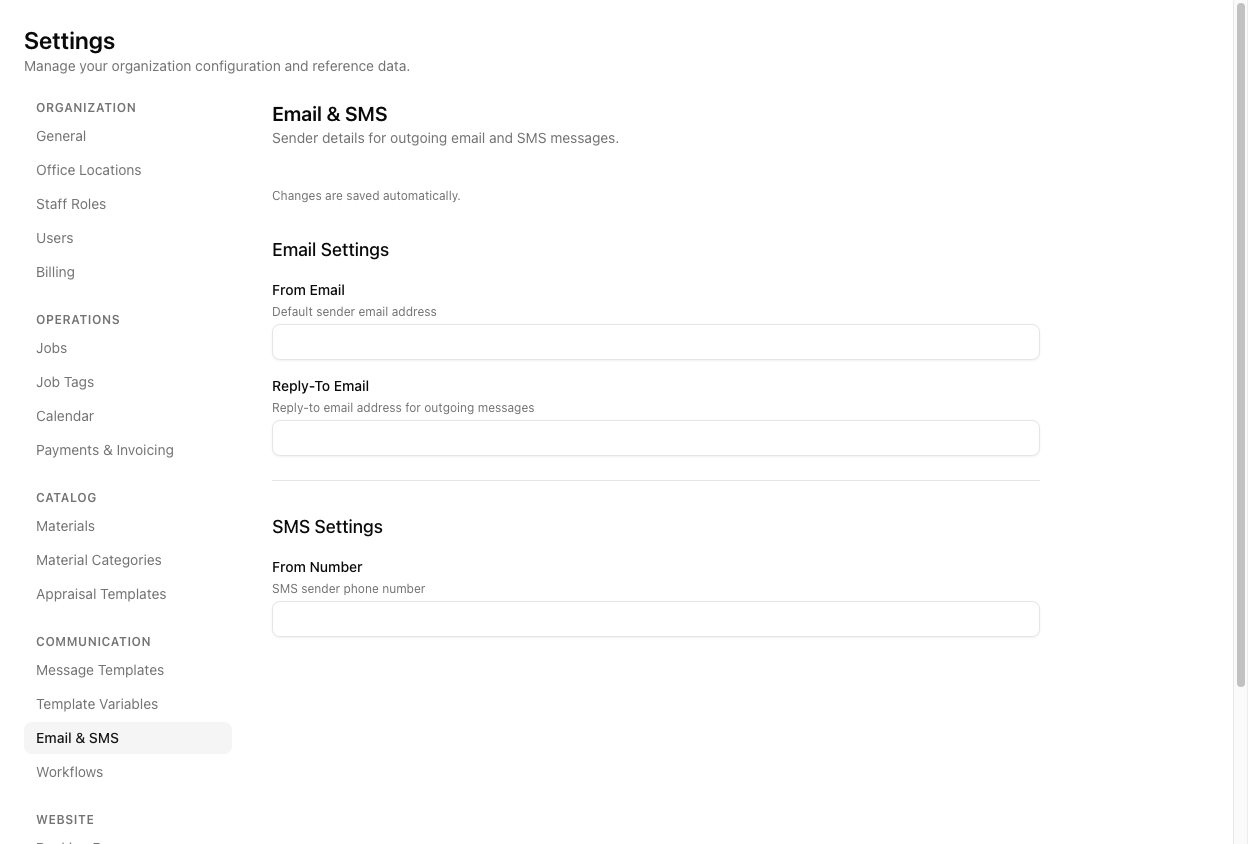
Customers reply to the number their message came from — the From Number at Settings > Email & SMS. That number is also how VanMan knows which business the reply belongs to.
It compares the sender's number against your contacts' phone and mobile fields, normalising formats — +64…, 027…, and bare digits all match the same person.
If that contact has jobs, the reply lands on the most recently created one.
If no job matches, VanMan attaches the reply to the contact's most recent matching booking request instead. This is genuinely useful: you can hold a two-way conversation with someone who is still just an enquiry, and the whole thread comes across when the request converts into a job.
The gotchas that actually bite
"Most recently created" is not "most recent active". There is no filter on status. A reply can land on a job that was completed months ago, simply because it was the last one created for that contact. If a regular customer's reply appears somewhere strange, this is why — look for their newest job record, not their live one.
A reply that can't be traced to a business is invisible. If VanMan cannot work out which business a reply belongs to — no matching From Number, and the sender's number matching contacts in more than one — it deliberately attaches the message to nothing rather than risk showing a customer's text to the wrong company. It is kept for audit but nobody sees it, and it will not appear in the Inbox.
A correctly configured From Number is what prevents this. It is the setting that makes reply matching work.
You do get told now — but only in one place. The sidebar's Inbox item carries a live unread count, and it covers SMS as well as email. That is the notification. There is still no push, no email alert and no dashboard badge for an inbound SMS.
So the process to build is: somebody watches the Inbox. A team that sends reminders and never opens the Inbox is running a one-way channel and doesn't know it.
If a reply is unmatched, its label falls back to the raw phone number instead of a name — a sign the sender is not in your contacts.
Tutorial: run a two-way SMS conversation
A customer replies to a day-before reminder asking to shift their start time.
Go to Settings > Email & SMS and confirm From Number has a value. This is not optional housekeeping — without it, replies have nowhere to arrive and matching cannot resolve your business.
The number on the sidebar's Inbox item is your signal that something has come in. Make somebody responsible for it the way somebody is responsible for the phone — an unread count nobody owns is the same as no notification at all.
Open the job and click Messages. Reload if you have had the page open — the tab does not refresh itself. The reply shows as SMS from Emma Sutton, green inbound arrow, Delivered.
Click the message to read the full text: "Any chance we could start at 10 instead of 8?"
Change the schedule on the job before you answer. Answering first and then getting distracted is how a job runs at the wrong time — the text is a request, the job is the record.
Click Send Message in the header. It opens in SMS mode with the customer loaded. Write:
No problem Emma — we've moved you to a 10:00am start tomorrow. See you then.
Click Send SMS.
The Messages tab now shows the outbound reminder, their inbound reply, and your outbound confirmation in order. Anyone opening this job later can see the whole exchange and why the time changed.
If a repeat customer's reply appears on an old completed job, that is the "most recently created" rule, not a bug. Read it there, then go to the correct job to act and reply — so the live job carries the conversation that belongs to it.
Replies to an enquiry that has not yet converted attach to the booking request, and come across with it when you convert. You do not need to create a job just to hold a conversation with a prospect.