
Converting a booking to a job
Turn a booking request into a job through the review dialog — trucks, status, and all.
When an enquiry becomes real work, you convert it to a job. This is not a silent one-click action — it opens a review dialog where you check and complete the details first.
Start the conversion
Open the request's detail sheet and click Convert to Job (capital J). There is no prerequisite status — you can convert a request that is New, Contacted, or Quoted.
The review dialog
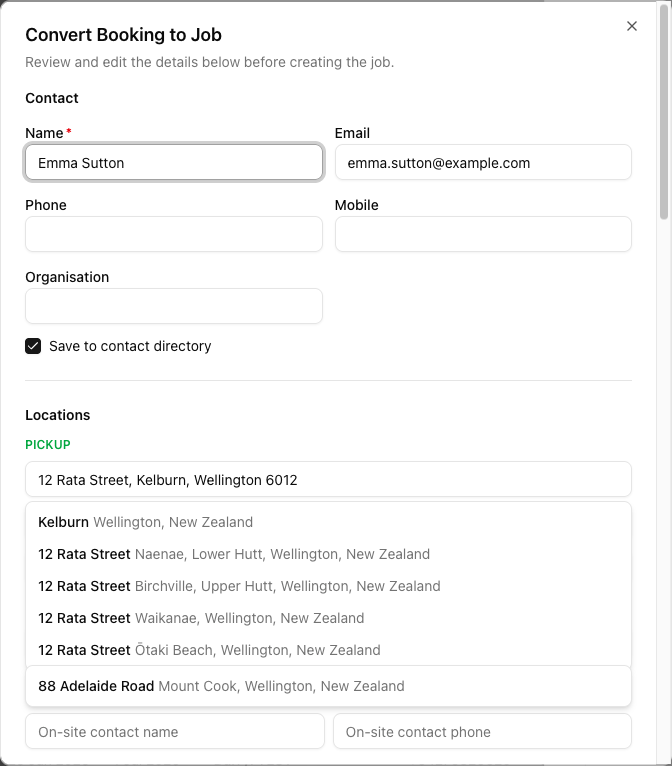
The dialog is titled Convert Booking to Job — "Review and edit the details below before creating the job." Everything is prefilled from the request and everything is editable:
- Contact — Name, Email, Phone, Mobile, Organisation, and a Save to contact directory checkbox (on by default).
- Locations — pickup and drop-off.
- Schedule — a single Start Date/Time, and a Duration as pills (2h, 3h, 4h, 5h, 6h), with the office hours shown.
- Logistics — settlement, keys, storage.
- Load Details — property type, item list, packing, dismantling.
- Special Requirements, Status, and Trucks (checkboxes — the first ticked is primary).
Click Confirm Conversion to create the job.
This replaces the old idea of a "one-click" convert that dumps you into a job editor. There is no separate job-editor step, no truck dropdown, and no Save job button. Trucks are checkboxes, the schedule is a date-time plus duration pills, and the button is Confirm Conversion. You set it all here, and the job is created ready.
What conversion does
- Creates the job, and takes you to it.
- Sets the booking request to Converted (it goes read-only, with a View Converted Job link).
- Optionally saves the customer to your contact directory, and copies any attachments and captured inventory across.
Auto-convert is different
If you have Automatically convert new bookings to Enquiry jobs switched on at Settings > Jobs, new requests convert on arrival, with no review dialog, and are forced to the Enquiry status. It also only works if a job status literally named Enquiry exists — if it does not, auto-convert silently does nothing.
So auto-convert and the manual review dialog are two different paths with different results. Use the manual one when you want to check the details; leave auto-convert off if you would rather review each.
Tutorial: convert a house move properly
The customer confirmed. Turn their enquiry into a booked job.
On Requests, open the enquiry and click Convert to Job. The review dialog opens — do not expect it to just make a job silently; it wants you to check things first.
The Contact fields are prefilled from what they submitted. Fix any typo now — this is the moment the customer record is created. Leave Save to contact directory ticked so they are added to your contacts.
Set the Start Date/Time to the agreed slot, and pick a Duration pill that matches the job — a three-bedroom house is not 2h. The dialog shows where it ends and the office hours, so you can sanity-check it.
There is no separate end-time field; the duration pill sets the length.
Tick the Trucks you need — the first ticked becomes primary. This is where trucks are set, as checkboxes. You are not going to a job editor afterwards to add them, so do it now.
The customer confirmed, so set Status to Booked rather than leaving it on the default. This is the manual convert path, so you choose — unlike auto-convert, which would force Enquiry.
Click Confirm Conversion. The job is created with everything you just set, and you land on it. The booking request now reads Converted.
Additional stops beyond pickup and drop-off carry over but are not editable in the dialog — check them on the job. Then the job is live and on your calendar.