
Job history and audit trail
Read a job's Activity tab to see every change, who made it, when — and expand a row for the detail.
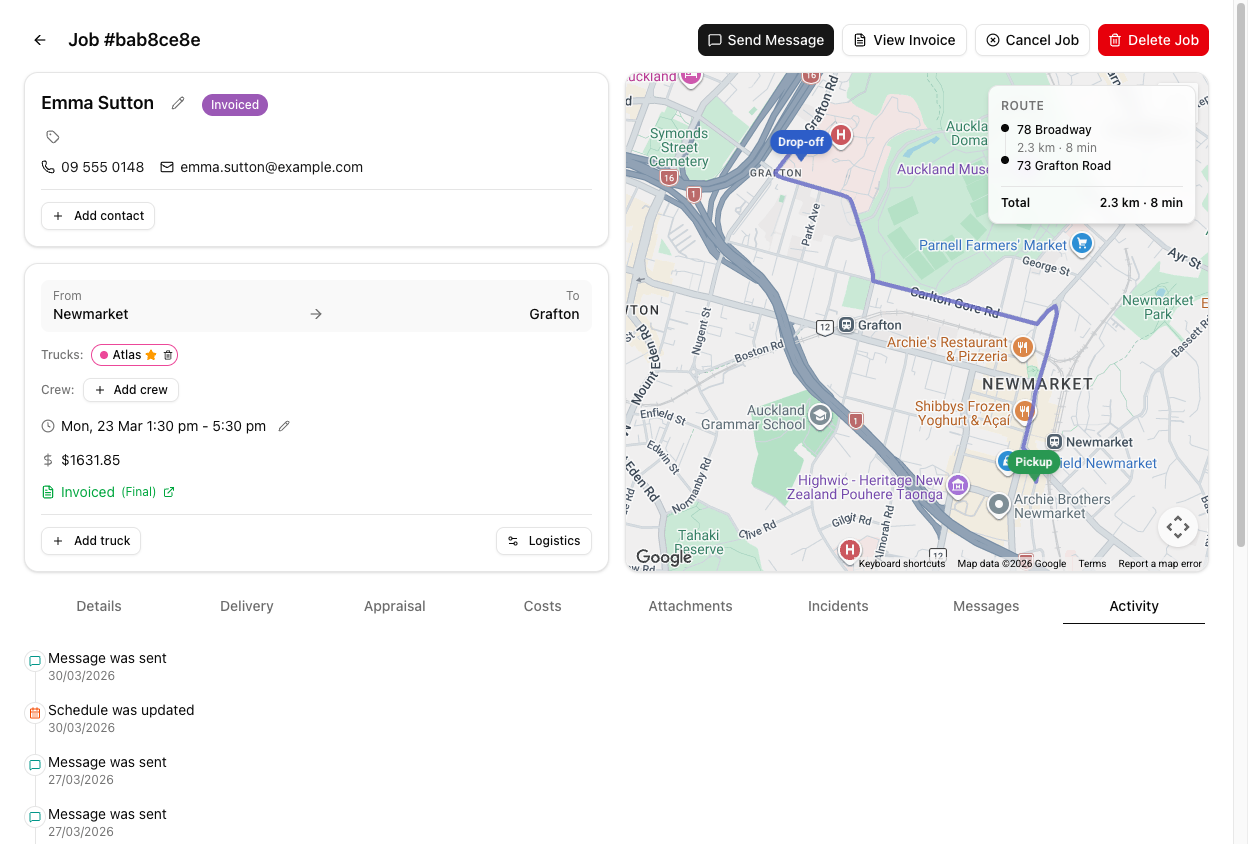
Every job records what happened to it on its Activity tab — the last tab on the job page.
What gets recorded
| Entry | Logged when | | --- | --- | | Job was created | The job first existed | | Status was changed | Any status move, by a person or an automation | | Schedule was updated | Date or times changed | | Truck assignment was changed | Trucks added, removed, or swapped | | Contact was changed | A different contact linked | | Location was changed | An address edited, added, or removed | | Notes were edited | Notes changed | | Message was sent | An SMS or email went out | | Invoice was created | An invoice was raised | | Delivery started / stopped / completed | The crew's time tracking | | Delivery times updated / edited / deleted | Delivery records changed | | Message assigned / Email captured | A message was linked to this job from the Inbox, or captured from the mailbox | | Payment recorded, Expense added to costs | Money in and out | | Materials / Adjustments updated | The Costs tab changed | | Appraisal started / completed / failed, Appraisal photo added | AI appraisal | | Attachment added / deleted, Crew added / removed / updated, Crew times updated, Timesheets created, Alert created, Xero invoice requested | …and about thirty more |
Entries are newest first. Recent ones show relative time — "5 mins ago", "3 hours ago" — and after about a month they switch to a plain date. Each line also names who did it — · by Sarah Kim — where VanMan knows.
Expand a row for the detail
Click any entry and it opens to show what actually changed, along with the full date and time. What you get depends on the entry:
| Entry | What the detail shows | | --- | --- | | Status was changed | The old status and the new one, as coloured badges | | Job was created | Initial status, trucks, and whether it came from a booking or a duplicate | | Message was sent / captured / assigned | Type, recipient, subject, a preview of the body — and its delivery status | | Contact was changed | The contact's name, company, email and phone | | Invoice entries | Customer, total, status, and a link through to Xero where there is one | | Delivery entries | The times and the entry that changed |
The expanded row is where the audit trail actually earns its keep. The collapsed line tells you something happened; the detail tells you what it was before. Get into the habit of clicking rather than reading the list.
What it does not record
Full Xero sync history. Invoice was created is logged, and expanding it links through to the invoice in Xero. But the blow-by-blow of what Xero accepted and rejected is in the Xero audit log under Settings > Integrations — see viewing the Xero audit log.
Free-text edits, word for word. Notes were edited tells you the notes changed and who changed them. It does not keep a diff of the old text.
Automatic changes are logged too
Status changes made by a message template's Auto-change Status, or by a workflow, appear here as ordinary Status was changed entries, marked as automatic.
This is the answer to "who moved this job and why does nobody remember doing it?" — usually nobody did. A template moved it.
Tutorial: reconstruct a disputed job
The customer insists they booked Tuesday and were never told it moved. Work out what actually happened.
Go to the job's Activity tab and scroll to the oldest entry. Job was created is where the story starts. Reading upward gives you the sequence in the order it happened.
Look for Schedule was updated. Click it open — the detail gives you the full timestamp and who made the change. That is the moment the date moved and the person who moved it.
Look for a Message was sent entry after the schedule change. If there isn't one, nobody told them — the customer is right, and that is your answer.
If there is one, you are not finished. Message was sent only means it left VanMan.
Click it open. The detail shows the recipient, the subject, a preview of the body and its delivery status. Failed or Bounced means you sent it and it never arrived — you did the right thing and the customer still never heard. That is a completely different conversation from "we forgot".
Expand the message on the Messages tab. A confirmation with a broken variable can arrive perfectly and say nothing useful. "Delivered" and "understood" are not the same.
If the job's status changed at an odd moment, look for a Status was changed entry that nobody claims. A message template with Auto-change Status set will move a job silently — that is by design, and it is logged here.
Put the conclusion in the job's Notes, with the sensitive part hashed:
Confirmed we emailed the date change on the 12th. ##Email bounced — their address on file is wrong. Our error for not following up. Do not charge the change fee.##
Now the next person to open this job inherits the finding instead of redoing the investigation.
Activity plus Messages together answer most disputes: Activity tells you what your team did, Messages tells you whether the customer actually received it. Neither is sufficient alone.