
Understanding job statuses
What job statuses are, which ones change by themselves, and which ones don't.
A job's status is where it sits in your pipeline. It drives what shows on the calendar, which tabs appear on the job, and what your automations react to.
Statuses belong to your business, not to VanMan. They are data in your account, not a fixed list baked into the product. The statuses below are what a new account starts with — yours may differ, because someone can have added or renamed them. Trust the Status dropdown on a job over any list in this article.
The default set
A new account starts with eight, in this order:
| Status | Colour | Typically means | | --- | --- | --- | | Enquiry | Red | A lead. Not committed to anything. | | Appraisal | Blue | You are working out what the job involves and what it costs. | | TBC | Orange | Verbally agreed, not locked in. The one jobs go stale in. | | Booked | Green | Confirmed. It is happening. | | Ongoing | Black | The crew is on it right now. | | Completed | Grey | The work is done. | | Invoiced | Dark blue | The invoice has gone out. | | Cancelled | Light grey | It is not happening. |
Your account may add its own — a separate Paid after Invoiced is a common one.
What the status changes about the job
Status is not just a label:
- Appraisal shows the Appraisal tab and hides the Costs tab. If Costs has vanished from a job, check its status before assuming something is broken.
- The calendar hides Completed, Cancelled, and Enquiry by default. A job you cannot find on the calendar has usually not disappeared — it is filtered out by status. Tick it back on in the calendar's Status filter.
- Workflows trigger on status changes, so statuses are what your automations watch.
Which statuses move by themselves
Three things change a status without anyone choosing it from the dropdown:
- Starting a delivery sets the job to Ongoing.
- Completing a delivery sets it to Completed.
- Sending a message template that has an Auto-change Status set moves the job to that status. This is recorded in the job's Activity as an automatic change.
Creating an invoice does not set the job to Invoiced — but sending it to Xero does.
These are two different actions and they behave differently. Raising the invoice logs an Invoice was created activity and leaves the status alone. Sending that invoice to Xero moves the job to Invoiced and logs the status change.
So a job stuck on Completed with an invoice against it has almost always had the invoice created but never sent to Xero.
If you do not use Xero, moving a job to Invoiced is a manual step, or something you automate with a workflow on Invoice Sent.
Everything else is a human choosing from the Status dropdown, or a workflow's Change Status action.
The default for new jobs
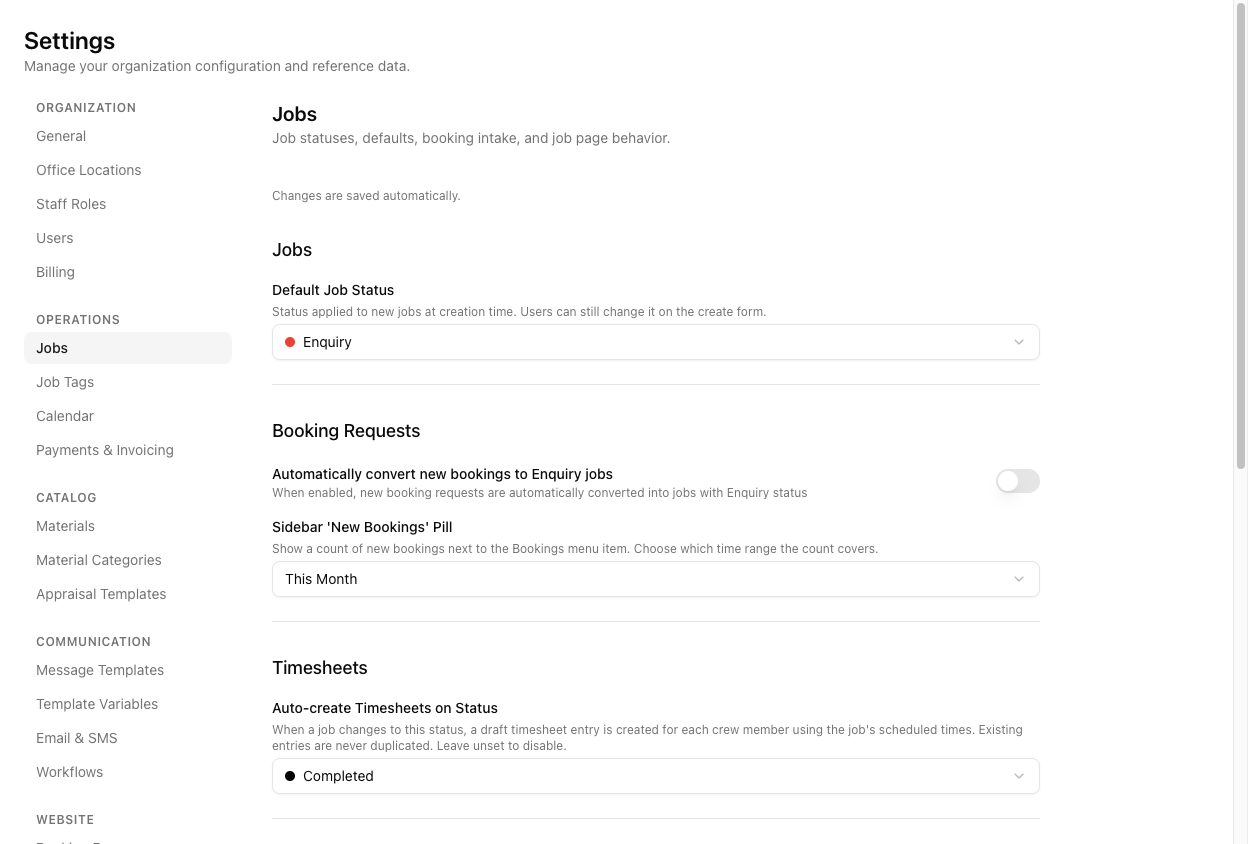
Default Job Status at Settings > Jobs is what new jobs are created with — Enquiry out of the box. Whoever creates the job can still change it on the form.
There is currently no screen for adding, renaming, or reordering statuses. The management interface is switched off in this version, even though the Settings → Jobs page describes itself as covering job statuses. If you need a status added or renamed, that is a request to your VanMan administrator, not something you can do yourself.
Tutorial: work out why a job vanished
An operator says a job has disappeared off the calendar. It has not.
Go to Job Search and search the customer's name. Job Search has no default status filtering, so it sees everything the calendar hides.
The Status column tells you immediately. If it reads Completed, Cancelled, or Enquiry, you already have your answer — the calendar hides all three by default, and the job is exactly where it should be.
Open the Calendar and look at the Status filter in the left sidebar. The hidden ones are unticked. Tick Completed and the job reappears in place.
Nothing was lost. The default filter is doing its job — a calendar showing every enquiry and every completed job for the last year is unreadable.
Say it reads Ongoing and the move finished yesterday. Ongoing is set automatically when a delivery starts, and Completed is set automatically when the delivery is completed — so this job's delivery was started but never completed. The status is telling you the truth about your process.
If the job has an invoice but still reads Completed, the invoice was created but never sent to Xero. Creating leaves the status alone; sending is what moves it to Invoiced.
Open the invoice and send it. The status follows on its own — do not just set it by hand, or you will have a job marked Invoiced with nothing in your accounts.
Open the job's Activity tab. Status was changed entries record every move, including the automatic ones. If a status changed and nobody admits to it, a message template with Auto-change Status is the usual culprit.
TBC is where money quietly dies — verbally agreed, never confirmed, never chased. A workflow that waits two days and flags anything still sitting in TBC is the single highest-value automation most movers can build. See setting up job alerts.