
Choosing a pricing mode: fixed, hourly or hybrid
Every job is priced one of three ways. What each mode does to the estimate, the costs tab and the invoice.
Pricing is now the first decision on a job, not a detail buried in the numbers. Open the Estimate tab on a new job and the first thing it asks is How is this job priced? — because everything after that follows from the answer.
The three modes
One agreed total. You type the price the customer pays; VanMan works the implied hourly rate out for you from the crew size and hours. Good for standard moves, packing jobs and anything you quote as a flat number.
A rate per hour. You set the rate, the crew size and a time estimate (or a low–high range), and the total is calculated. The traditional removals model.
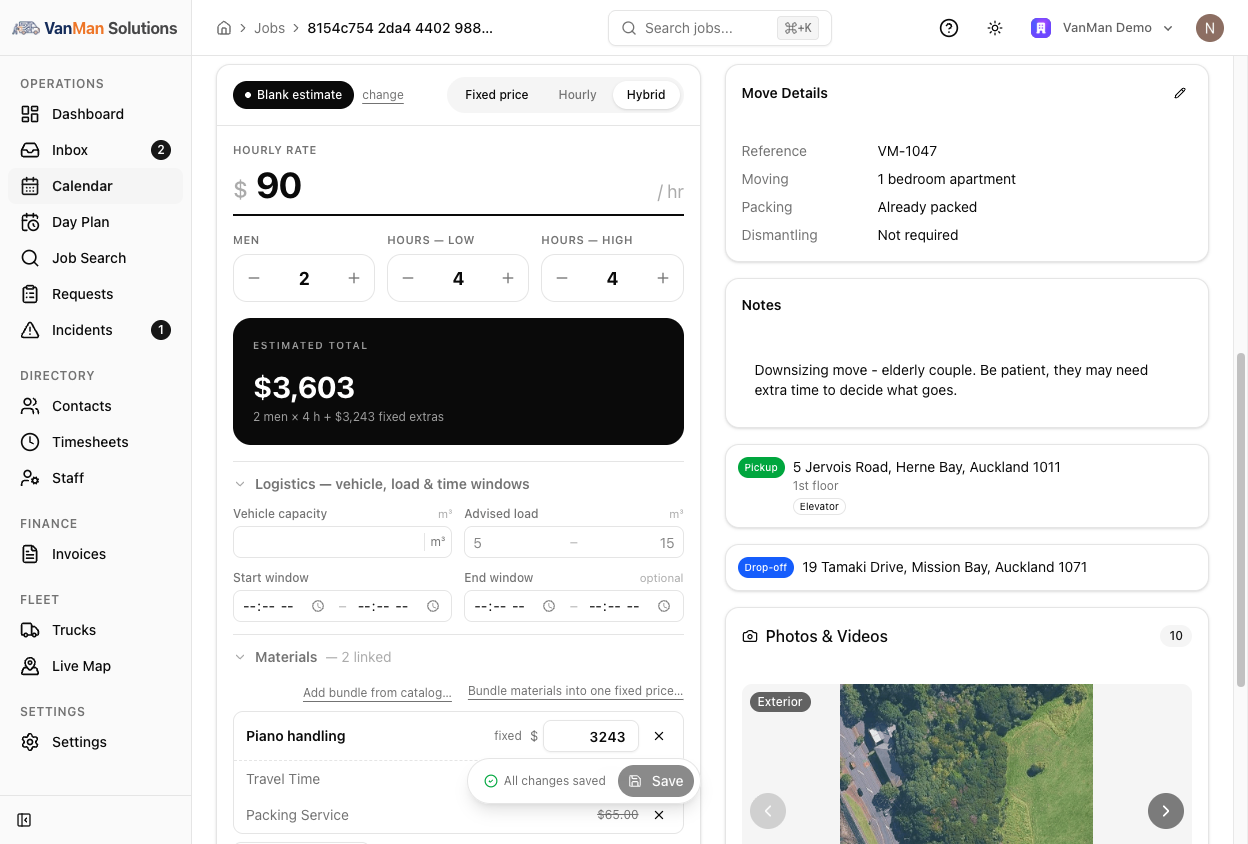
Hourly base plus fixed-price extras. The labour runs on an hourly rate, but bundles and specific items are priced at a set amount on top. Good for "hourly, plus $250 for the piano and $180 for materials".
Once you've picked a mode, the estimate offers appraisal templates set up for that mode — so a fixed-price job is offered your fixed-price templates, not a list you have to filter mentally. Everything stays editable, and there's a Start from a blank estimate link if none of them fit.
You can change your mind at any time from the Fixed price / Hourly / Hybrid toggle in the estimate header.
A fixed-price job with no price entered is flagged in red on the estimate card. It is not a warning to work around — an estimate with no number in it will send a customer a quote for nothing.
What changes on the Costs tab
The job's Costs tab carries the same choice, in a Contract dropdown at the top: Hourly Rate, Fixed Price, Hybrid. Jobs that aren't hourly also show a badge in the job header, so you can see at a glance how a job is priced.
Fixed price
You get a fixed-price block with the price, the men and the hours behind it. Below, the cost items become internal cost tracking — what the job actually consumed. The customer still pays the fixed price; the receipt panel shows:
| Line | What it is | | --- | --- | | Fixed price | What the customer pays | | Internal costs | What the job actually cost you | | Margin | The difference, green if you made money |
That margin line is the reason to record costs on a fixed-price job at all. It's how you find out that the flat rate you've been quoting for three-bedroom moves stopped covering them.
Two switches control what the customer sees: Show Sub Items on Invoice and Show Sub Item Amounts on Invoice. Off by default — a fixed-price invoice usually shows a single line.
Hourly
Cost items are what gets billed. No margin panel, because the price is the sum of the items.
Hybrid
The hourly base, plus bundles you drop onto the job — see using bundles. The receipt shows the item subtotal incl. n bundles, so you can see how much of the total is fixed-price extras.
Bringing the estimate into the costs
Once a job is done, Import estimate on the Costs tab pulls the estimate's pricing over as real cost lines, rather than retyping it. The preview shows exactly what will be created and compares the two totals:
Estimate $1,240.00 → Import $1,240.00 — matches
If it says differs from estimate, don't just click through. Something was edited on one side and not the other, and that gap is the difference between what you quoted and what you're about to bill.
Import replaces what's on the Costs tab. Do it before you start hand-editing costs, not after.
Decimal hours and quantities
Hours and quantities take decimals. Type 1.5 and it stays 1.5, and the + / − buttons on decimal fields step in halves. Half-hours and half-boxes are normal in removals; you no longer have to round them away.
Which mode should you use?
| Situation | Mode | | --- | --- | | You quoted a flat number and stand by it | Fixed price | | You charge by the hour and bill what it took | Hourly | | Hourly labour but a set fee for materials, travel or a piano | Hybrid | | You want to know your margin on a flat-rate job | Fixed price — and record the real costs |
Whichever mode you pick, the mobile app shows the crew the same estimate — pricing mode, totals, logistics, materials and bundles — so the team on the truck isn't guessing. See viewing the estimate on mobile.